
Documentation Index

Fetch the complete documentation index at: https://labs.prompthon.io/llms.txt

Use this file to discover all available pages before exploring further.

This setup path is for Windows users. OpenClaw workshop commands should run inside Ubuntu on WSL2 unless a later step explicitly says otherwise.

Install Or Verify WSL2

Open PowerShell and check your current WSL status:
wsl --status
wsl -l -v
You should see Ubuntu running on WSL version 2:
  NAME      STATE           VERSION
* Ubuntu    Running         2
If Ubuntu is installed but still on WSL1, convert it:
wsl --set-version Ubuntu 2
If WSL is missing, run PowerShell as Administrator and install it:
wsl --install

Enter Ubuntu

Open Ubuntu from your Windows terminal. Open Ubuntu from the Windows terminal Prepare local binary folders and npm’s global prefix:
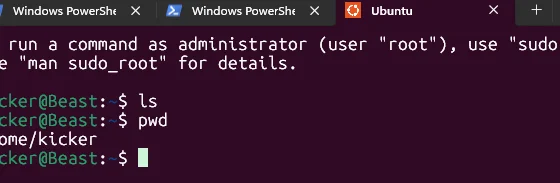
mkdir -p ~/.local ~/.local/bin ~/.npm-global/bin
npm config set prefix "$HOME/.npm-global"

Install Node.js With NVM

In the Ubuntu terminal, install and load nvm:
curl -o- https://raw.githubusercontent.com/nvm-sh/nvm/v0.39.7/install.sh | bash

export NVM_DIR="$HOME/.nvm"
[ -s "$NVM_DIR/nvm.sh" ] && . "$NVM_DIR/nvm.sh"
Install and use Node 22:
nvm install 22
nvm use 22
Verify Node and npm:
node -v
npm -v

Install Codex CLI

Install Codex globally inside WSL:
npm i -g @openai/codex
codex --version
Then continue to Accounts And Onboarding.